

After a fire, storm, theft, or other major loss, remembering every item in a home can be surprisingly difficult. A simple room-by-room video inventory can help homeowners, landlords, and other property owners document what was there before a loss and provide useful context during a claim.
This does not need to be a polished production. A clear walkthrough recorded on a phone, stored somewhere safe, and updated from time to time can become one of the most practical pieces of pre-loss documentation you have.
What Is a Home Video Inventory?
A home video inventory is a narrated walkthrough of your home, rental property, or furnished space. As you move from room to room, record the belongings, built-ins, finishes, and storage areas that would be difficult to reconstruct from memory later.
- Open closets, cabinets, drawers, garages, and storage areas.
- Name or briefly describe the items you are recording.
- Capture model numbers, serial numbers, or labels on higher-value items when practical.
- Mention recent purchases, renovations, or upgrades.
- Record enough detail to show quantity, condition, and context.
The goal is documentation, not production quality. A useful video is clear, complete, and safely stored.
Why Memory Fails After a Major Loss
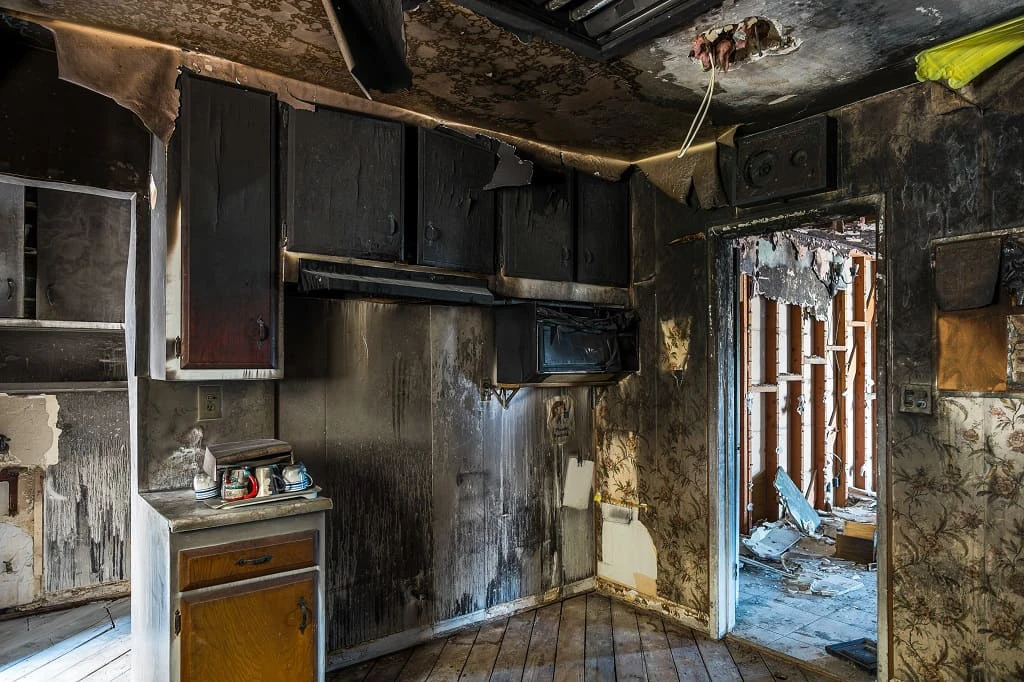
People often underestimate how much is inside a home until they have to recreate it from memory. After a traumatic event, that job becomes even harder. Details disappear quickly: the contents of kitchen cabinets, closets and dressers, tools in a garage, furnishings in a rental, hobby equipment, children’s belongings, and items tucked into basements or storage rooms.
A video inventory gives you a starting point. Instead of relying only on recall weeks or months later, you can refer to a visual record of what the space looked like before the loss.
How Insurance Companies Verify Personal Property Claims
Claim documentation requirements vary by insurer, policy, and loss. You may be asked for descriptions of damaged or missing items, approximate age, original cost if known, estimated replacement cost, receipts, photographs, model numbers, or other supporting information.
A narrated walkthrough may help support ownership, quantity, condition, and context. It does not replace the policy’s requirements, receipts, appraisals, or special documentation for certain high-value items, and it does not guarantee coverage or payment. It can, however, make it easier to organize the information an adjuster may request.
Replacement Cost vs. What You Originally Paid
Personal property claims may be settled on an actual cash value or replacement cost basis, depending on the policy, endorsements, and claim circumstances. What you paid years ago may not be the same as what a comparable item costs today.
Video can add useful context: an appliance was installed during a remodel, a table was solid wood rather than particleboard, or a piece of equipment was purchased for a specific hobby. Those details can matter when identifying a comparable replacement. If you are unsure how your current policy treats personal property, our Homeowners Insurance overview explains the coverage areas worth reviewing.
Why Video Works Better Than Photos or Lists Alone
Photos, receipts, and written lists are all useful. Video adds narration and spatial context, and it can capture hundreds of items in a relatively short amount of time. A single walkthrough may reveal belongings that people forget to photograph individually.
Video can show
- How rooms were furnished
- What was inside storage areas
- Approximate quantity and condition
- Brand, model, or identifying details
Keep alongside it
- Receipts for major purchases
- Appraisals for scheduled valuables
- Serial numbers and warranty records
- Renovation invoices and photographs
Who Should Do This?
Nearly every property owner can benefit from a video inventory, but it is especially useful for homeowners who have lived in the same home for years, landlords with furnished rentals, owners of short-term rentals, families with children, people who have recently remodeled, and anyone with collections, tools, electronics, or specialty equipment.
Tenants can benefit too. A landlord’s policy generally does not insure a tenant’s personal belongings, which is one reason Renters Insurance and good documentation matter. Rental-property owners can also review the distinct building and liability considerations on our Landlord Insurance page.
How to Record a Useful Video Inventory
- Start outside. Record the exterior, detached structures, major improvements, and any outdoor equipment.
- Move room by room. Pan slowly and open closets, cabinets, drawers, and storage areas.
- Narrate what matters. Identify brands, materials, age, renovations, or unusual features.
- Capture identifiers. Record model and serial numbers for electronics, appliances, tools, and specialty equipment when practical.
- Protect private information. Do not linger on financial documents, account numbers, passwords, or other sensitive records.
- Save supporting records. Keep important receipts, appraisals, and renovation invoices with the video or in the same secure storage system.
Most households can create a useful walkthrough in about 10 to 20 minutes. Perfection is not the goal. Coverage documentation that exists is more useful than an elaborate inventory that never gets finished.
Where and How to Store Your Video Inventory
The recording should be available even if your phone, computer, or home is affected by the same loss. Keep at least one copy off-site or in secure cloud storage, label the file with the date, and confirm that you can open it from another device.
- Upload a copy to secure cloud storage.
- Email a copy to yourself or store it with your digital policy records.
- Keep a second copy on an off-site drive if that fits your routine.
- Update the video annually and after major purchases or renovations.
Professional Walkthrough Services
Some homeowners ask whether their insurance agent should visit the property to record the video. For most households, that is unnecessary. The owner can usually document the property more efficiently because they know what is stored in each room and what details are important.
Complex collections, antiques, jewelry, fine art, business equipment, or other high-value property may warrant appraisals or a professional inventory service. An insurance review can help identify items that may be subject to special limits or need separate scheduling.
Frequently Asked Questions
Do insurance companies accept a home video inventory?
A video inventory may help support what you owned and provide context about condition before a loss. It may not replace receipts, appraisals, inventories, or other documentation requested by the insurer. Claim decisions remain subject to the policy and the insurer’s review.
How long should a home video inventory be?
For many homes, 10 to 20 minutes is enough for a practical room-by-room walkthrough. Larger properties, furnished rentals, collections, or extensive storage areas may take longer.
What should I say while recording?
Briefly describe the room, major items, approximate age, renovations, and identifying details. For higher-value belongings, capture brand names, model numbers, serial numbers, and supporting records when possible.
Where should I store the video?
Use secure cloud storage or another off-site location that will remain accessible if the property is damaged. Keep more than one copy and protect the files with strong account security.
Should I update it every year?
An annual update is a sensible rhythm. Record a fresh walkthrough sooner after major purchases, renovations, additions, or significant changes to furnished rental property.
Do landlords and rental-property owners need one too?
Yes, particularly for furnished rentals, appliances, fixtures, tools, landscaping equipment, and pre-loss condition. A move-in and move-out record may also help document the property, although lease and legal requirements are separate considerations.
Will a video inventory tell me whether I am underinsured?
It may reveal that the value of your belongings is higher than expected, or that certain items could be subject to special limits. A coverage review can help you compare that inventory with the limits, deductibles, endorsements, and settlement terms in your current policy.
Request a Coverage Review
A video inventory is a smart first step. The next is making sure your coverage limits and policy details still fit the property and belongings you are protecting. We can help Ohio homeowners, landlords, and families review what they have and identify questions worth a closer look.
Submitting a review request does not bind, change, or cancel coverage. Policy terms, limits, exclusions, deductibles, and claim documentation requirements apply.